
Everyone wants free Claude tokens. The model is excellent, the bills add up fast, and most of the advice floating around is either outdated or a thin excuse to sell you a subscription. This guide takes a more practical route. You’ll learn which free Claude token options actually exist, how to connect the Claude desktop app to a gateway using its built-in third-party inference settings, and where to find free tokens from other top LLMs when Claude’s own limits run out.
You can get free Claude tokens through the free Claude.ai plan, starter credit on a new Anthropic Console account, startup programs, or a gateway that offers trial credit. Then add the gateway URL and API key in Claude Desktop under Developer, then Configure Third-Party Inference.
What “Free Claude Tokens” Really Means in 2026
A token is a small chunk of text, roughly three quarters of an English word. Every prompt you send and every reply you receive is metered in tokens, and that is what providers charge for. So “free tokens” simply means someone else is covering that meter for a while.
The catch is that “free” means four different things depending on where you look. Mixing them up is the most common reason people get frustrated, so let’s separate them first.
The Claude.ai free plan
The free plan gives you Claude in the browser, on mobile and on desktop, with a daily message limit. Anthropic doesn’t publish the exact number, and it can shift with demand. It’s the easiest way to try Claude, but it isn’t an API, so it can’t hand you a key to paste into other tools. It also doesn’t include Claude Code, which needs a paid plan or a Console account with credits.
Starter credit on a new Console account
Anthropic publishes no permanent free API tier. What it does say is that new users get a small amount of free credit to test the API. The amount isn’t stated on the pricing page. Some guides mention about $5, while other reports say the credit doesn’t always appear, so treat it as a possible bonus and not a plan.
Startup and open source programs
If you’re building a company, Anthropic’s startup program offers credits and higher rate limits to eligible teams. These are conditional and not guaranteed to every applicant. Open source maintainers have a similar program that some guides describe as six months of free access. Both involve an application and a review.
Gateways and routers with signup credit
This is the route the screenshots in this guide cover. A gateway is a service that accepts Anthropic-style requests and forwards them to a model. Some of them give new users starting credit, sometimes without a card. Claude Desktop can point at any of them with one URL and one key.
| Route | What you get | Card needed? | Best for |
|---|---|---|---|
| Claude.ai free plan | Chat with a daily message limit | No | Casual use and testing |
| Console starter credit | Small one-time credit, not guaranteed | Not for signup | Trying the API |
| Startup or open source program | Credits by application | No | Teams and maintainers |
| Gateway with signup credit | Varies by provider | Varies | Using Claude Desktop with a custom endpoint |
Why Claude Desktop Can Use Your Own Gateway
Claude Desktop has a developer setting that sends model calls somewhere other than Anthropic’s own servers. According to the LiteLLM documentation, once third-party inference is on, every model call from Cowork, Chat and Code sessions goes to the gateway you name.
The feature was built mainly for companies that run Claude through Bedrock, Vertex AI, Azure or an internal gateway. But the settings screen asks for the same things any individual would have: a base URL and an API key. That’s why it works as a way to use free Claude tokens from a provider you trust.
Before you start, check three things:
- Update the app. If the menu in Step 2 doesn’t show up, your version is probably too old.
- Turn on Developer Mode. Go to Help, then Troubleshooting, then Enable Developer Mode, and restart the app. Several gateway setup guides list this as the first step.
- Have your URL and key ready. Step 5 below explains what to look for, so you can read it first if you like.
Menu labels differ slightly between Windows, macOS and Linux, and between app versions. The screenshots here show the dark theme on a desktop build with the Cowork and Code tabs.
How to Get Free Claude Tokens Working in Claude Desktop: Step by Step
The whole process takes about two minutes once you have the credentials. Follow the steps in order.
Step 1: Click the Three Lines Menu Icon
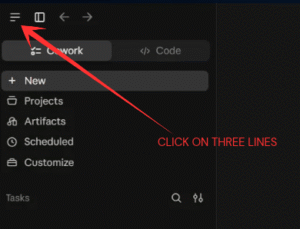
Claude desktop app with the three lines menu icon highlighted in the top left corner
Look at the top left corner of the Claude window. You’ll see a row of small icons: three horizontal lines, a sidebar toggle, and back and forward arrows. The three lines icon is the one you want, and it’s the first icon in that row.
Just below, you’ll see the Cowork and Code tabs, followed by New, Projects, Artifacts, Scheduled and Customize in the sidebar. None of those matter for this setup. Click the three lines and the application menu opens.
Step 2: Open the Developer Menu
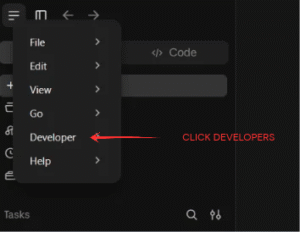
Claude desktop menu showing File, Edit, View, Go, Developer and Help with Developer highlighted
The menu lists File, Edit, View, Go, Developer and Help. Click Developer, which sits fifth in the list, just above Help.
If you can’t see Developer, don’t panic. It’s hidden until Developer Mode is on. Open Help, go to Troubleshooting, choose Enable Developer Mode, then close and reopen the app. After the restart the Developer entry appears.
Step 3: Choose Configure Third-Party Inference
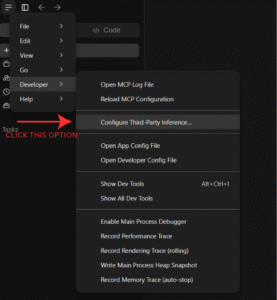
Developer submenu in Claude desktop with the Configure Third-Party Inference option highlighted
Hovering over Developer opens a long submenu. It starts with Open MCP Log File and Reload MCP Configuration, then a divider, and then the option you’re after: Configure Third-Party Inference…
Below it you’ll find Open App Config File, Open Developer Config File, Show Dev Tools and a handful of debugging and tracing tools. Leave all of those alone. They’re meant for developers and won’t help here. Click Configure Third-Party Inference and a settings window opens.
Step 4: Fill In the Gateway Credentials
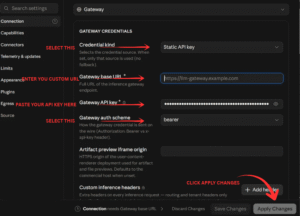
This is the screen that does the real work. On the left is a settings sidebar with Connection, Capabilities, Connectors, Telemetry and updates, Limits, Appearance, Plugins, Egress and Source. You’ll stay in Connection.
At the top, the provider dropdown should read Gateway. If it doesn’t, change it. That reveals the Gateway credentials card, where you fill in four fields:
- Credential kind: choose Static API key. The app uses only the source you pick here, with no fallback to another one.
- Gateway base URL: type or paste your provider’s full URL. The placeholder shows a generic example, so replace it entirely.
- Gateway API key: paste your key. It’s masked as dots, and the eye icon on the right lets you check that you pasted it correctly.
- Gateway auth scheme: choose bearer. That sends the key in an Authorization header, which is what most gateways expect. The other option uses an x-api-key header.
You’ll also see Artifact preview iframe origin and Custom inference headers. Leave both empty unless your provider’s instructions tell you otherwise. Custom headers are mostly for routing and tenant details in company setups.
Watch the footer while you work. It shows a note that the connection needs a gateway base URL until you fill one in. Once the field is complete, that warning clears. Then click Apply Changes in the bottom right corner. Save Changes stores your entries, while Apply Changes puts them to use. The app writes the configuration and then relaunches into it, so save any open work first.
After the restart, send a short test message. If you get a reply, you’re connected.
Step 5: Get Your Gateway URL and API Key
Every field in the form depends on two things you have to collect from a provider: a base URL and an API key. This section is where those come from.
SOURCES :
- Set this URL OPENROUTER
- Get Api from HERE
You can also use plenty of other third party websites which provide free api in there free plans , stay updated the next post will show how to get other Api keys and url’s .
Whichever source you use, check these details before you paste anything into Claude Desktop:
- The endpoint must be Anthropic Messages compatible. Claude Desktop in gateway mode expects that format. ZenMux’s guide warns specifically against using an OpenAI-compatible URL.
- Read the base URL rules. The app adds the request path itself, so some providers want the URL without a
/v1ending, while others, like Merge Gateway, want it to end in/v1/anthropicwith no trailing slash. Copy it exactly as shown. - Avoid redirects. Merge’s documentation notes that the app treats a redirect on its first check as a failure, so the URL should point straight at the service.
- Copy the key right away. Many dashboards show a new key only once. Store it in a password manager.
Free Tokens From Other Top LLMs
Claude is only one option. If your free Claude tokens run out, several other providers offer a free tier with no card. As of late October 2026, eight providers offer one: Google Gemini, Groq, OpenRouter, Mistral, Cloudflare Workers AI, NVIDIA’s API catalog, Cohere and SambaNova.
Here are the ones most people start with. Limits change often, so check each dashboard before you rely on a number.
| Provider | Free tier highlights | Notes |
|---|---|---|
| Google Gemini API | Flash and Flash-Lite models, limits shown in AI Studio | Pro models moved to paid tiers in 2026 |
| Groq | About 30 requests per minute and 1,000 requests a day on one popular open model | Very fast responses |
| OpenRouter | 20 requests per minute and 50 a day on free models | Daily cap rises after a small top-up |
| Mistral | Free mode with limits in the admin panel | Good for coding workloads |
| Cloudflare Workers AI | 10,000 Neurons a day, reset at midnight UTC | Useful for small apps |
Figures come from the October 2026 roundup on DEV Community and the OpenRouter free API comparison.
One thing to keep in mind: most of these services use an OpenAI-style API, which Claude Desktop’s gateway mode can’t read directly. They shine in tools that accept an OpenAI-compatible URL, or behind a gateway that translates between the two formats. Don’t paste a Gemini or Groq URL straight into the Claude form and expect it to work.
How to Stretch Your Free Claude Tokens Further
Free Claude tokens disappear quickly if you waste them. A few habits make a noticeable difference.
- Match the model to the job. Use a smaller, cheaper model for summaries, rewrites and quick questions. Save the largest model for hard reasoning.
- Start fresh chats. Long conversations resend the whole history with every message, so old context keeps costing you.
- Trim what you paste. Send the relevant section of a document, not the entire file.
- Cap the reply length. If you only need a short answer, say so in the prompt. Developers can also set a maximum output size.
- Use prompt caching where it exists. Repeated context gets cheaper when the provider supports it.
- Watch your usage page. Check the dashboard weekly so a runaway task doesn’t empty your balance overnight.
Safety Checks Before You Paste Any Key
An API key works like a password that also has a price tag. Handle it that way.
First, remember that a gateway sits between you and the model, which means it can see your prompts. Don’t send passwords, client data or private documents through a service you haven’t vetted. Look for a clear privacy policy, a real company behind the service and recent documentation.
Second, be wary of anyone offering unlimited free Claude keys. Shared and leaked keys get revoked without warning, and some sites exist only to collect your prompts or your login. If an offer sounds too generous, assume there’s a catch.
Third, set a spending limit wherever the provider lets you. A small cap turns a bad surprise into a minor annoyance. And rotate the key if you ever paste it somewhere public by mistake.
Troubleshooting Common Setup Problems
Most failures come down to a handful of causes.
- “Connection needs Gateway base URL” won’t go away. The URL field is empty or has a typo. Paste it again and check for stray spaces.
- Errors mentioning 404 or not found. The URL ending is wrong. Compare it to your provider’s documentation, paying attention to
/v1and trailing slashes. - Errors mentioning 401 or unauthorized. The key is wrong or expired, or the auth scheme doesn’t match. Try switching between bearer and the other option.
- No models appear in the picker. Some gateways need a model list entered by hand in the same settings window, instead of automatic discovery.
- The app still behaves like the normal version. Reopen Developer, then Configure Third-Party Inference, confirm Gateway is selected and apply the changes again. One provider’s guide says the status indicator should read Cowork 3P | Gateway when it’s active.
Conclusion
Free Claude tokens are real, but they come in small, specific packages: the free Claude.ai plan, a modest starter credit, programs for startups and open source projects, and gateways with signup credit. None of them is unlimited, and the honest approach is to combine them with a few free tiers from other providers.
The setup itself is simple. Open the three lines menu, go to Developer, choose Configure Third-Party Inference, then enter your base URL, key and bearer auth scheme and click Apply Changes. Get the credentials from a source you trust, protect your key, and keep an eye on usage.
Ready to try it? Open Claude Desktop now, follow the four steps above, then add your credentials from the Step 5 section and send your first test message.
Frequently Asked Questions
Is the Claude API free to use?
No, there’s no permanent free tier for the Claude API. Anthropic says new users receive a small amount of free credit to test it, and after that, usage is billed per token through prepaid credits. The free Claude.ai chat plan is a separate product and doesn’t include API access.
Does a Claude Pro subscription include API tokens?
No. Claude Pro and Max cover chat and Claude Code usage, but they don’t include API credits. The Claude Console is billed separately on a pay-per-token basis. Your subscription won’t raise your API balance, and your API spending won’t raise your chat limits.
How many free tokens does a new Anthropic account get?
Anthropic doesn’t publish a fixed amount. Many guides mention roughly $5 in starter credit, which covers somewhere around 100,000 to 200,000 tokens depending on the model. Other reports say it doesn’t always appear. Check the Billing section of your Console after signing up.
Is it safe to use a third-party gateway with Claude?
It’s safe only if you trust the gateway. The service can see your prompts and handles your key, so choose providers with clear privacy terms and a real company behind them. Never send sensitive data through an unknown gateway, and set a spending limit on your key.
Which gateway auth scheme should I choose in Claude Desktop?
Choose bearer unless your provider says otherwise. Bearer sends your key in an Authorization header, which most gateways accept. Some also support an x-api-key header, which helps when a network strips Authorization headers. If you get an unauthorized error, switching schemes is a quick test.
Can I use Gemini or Groq keys in Claude Desktop?
Not directly. Gateway mode expects an Anthropic Messages compatible endpoint, and Gemini and Groq mainly offer OpenAI-style URLs. You’d need a gateway that translates between formats. Otherwise, use those keys in tools that accept an OpenAI-compatible base URL. Some gateways handle that translation for you.
What is the best free LLM API besides Claude?
Google’s Gemini API is a strong first choice because its Flash models are free without a card. Groq is great for speed, and OpenRouter gives you many free models behind a single key. Limits change often, so compare the current numbers in each dashboard.
Also read : Why Free AI Chatbots Like ChatGPT & Claude Are Booming in 2026 ?